Events and the calendar · No extra charge in the beta
One calendar. Sign-ups that look after themselves.
Events puts your church’s events and service times on one calendar, in PraisePad and on your church site, where people sign up a whole family without an account. Tickets, check-in at the door and rooms come with it.
No extra charge in the beta: an owner turns Events on under Settings, then Modules. Selling tickets needs PraisePad Giving, and of each ticket Stripe takes its card fee and PraisePad 0.5%; free tickets work for any church.
- Learn your part: Events For whoever organizes your church's events
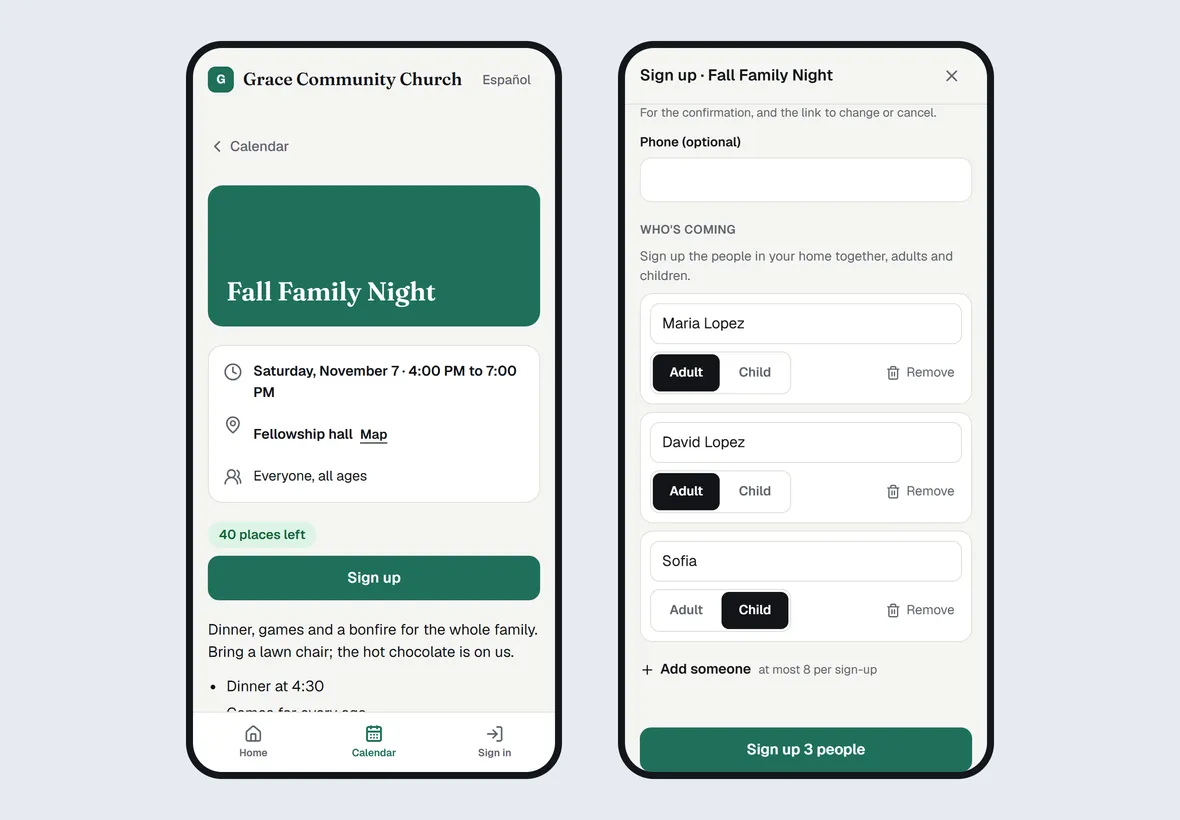
Sign-ups without the spreadsheet.
Places and a waitlist that moves on its own: when places open, the next family in line gets an email and 48 hours to take them. Every email carries a link to change or cancel, no account needed, in English or Spanish, and a reminder comes the day before.
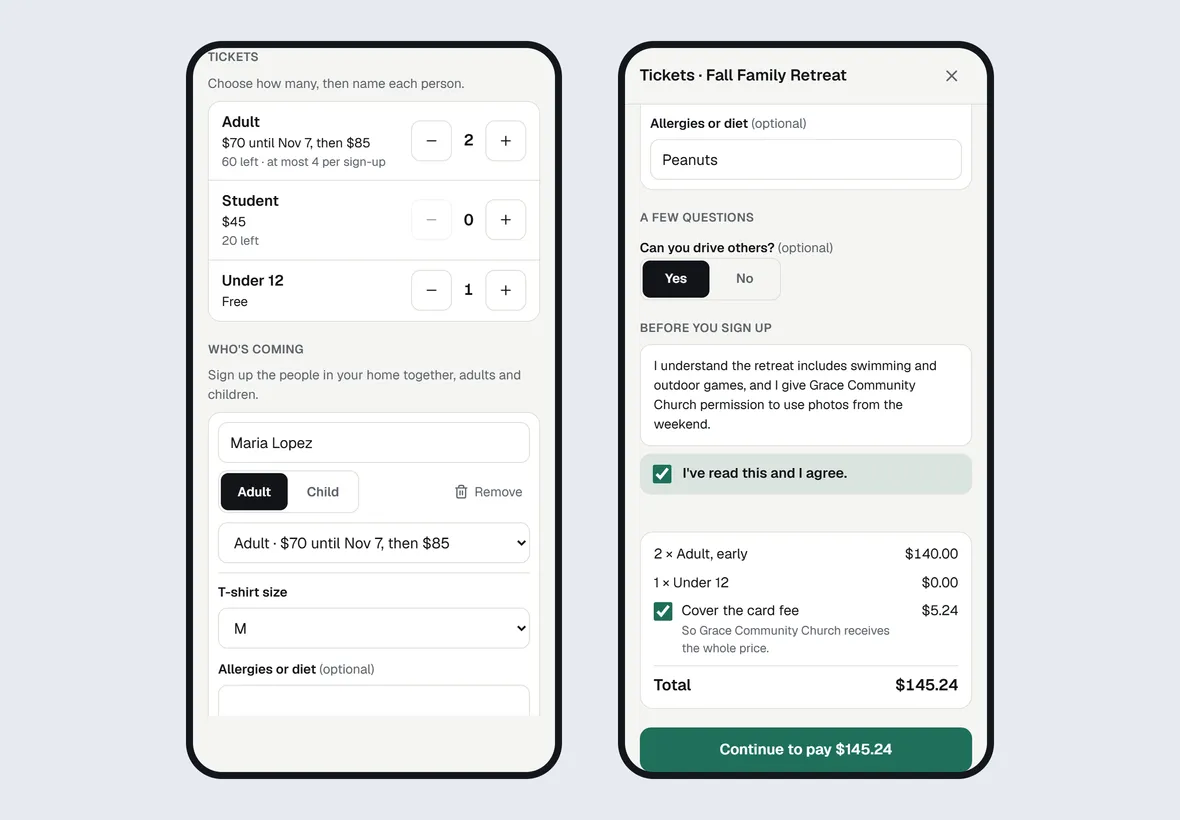
Tickets, paid to your church.
Prices, early prices, deposits and discount codes, paid by card, Apple Pay or Google Pay straight into your church’s own Stripe account through PraisePad Giving; free tickets work without it. At the door, an iPad or phone scans tickets, adds walk-ups, takes cash and prints name tags, and with no Wi-Fi it keeps finding names and checking people in.
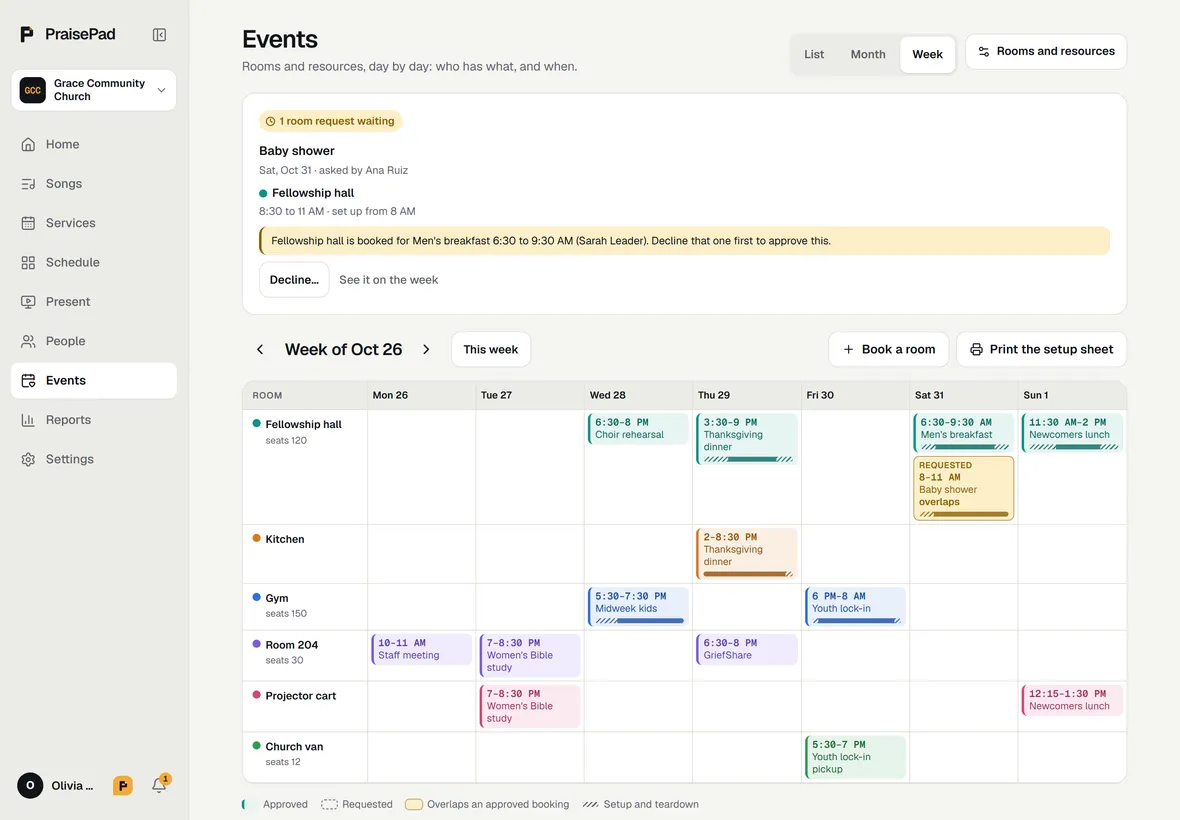
Rooms that never clash.
Book the fellowship hall, the van or the projector from an event, with someone to approve each booking. Two approved bookings of one room never overlap, and the Week view prints a setup sheet for the weekend.
What’s in it
- Your church calendar: make an event, and who sees it One calendar for your events and service times. Make an event, choose who sees it, publish it, and share it.
- The Calendar on your church site, and signing up there Your public events on your site's Calendar: subscribe, open an event, and sign up a whole family with no account.
- Sign-ups and Who's coming Places, a waitlist that keeps its order, and the list of who's coming, with export and Message everyone.
- Sign-up questions and an agreement Ask what you need to know, of each person or once a sign-up, and add words everyone agrees to, like a waiver.
- Tickets: prices, places, and paying on your church site Sell tickets for an event or give free ones: prices and early prices, places, a ticket by its own link, and fees.
- Deposits and discount codes Take part of a ticket's price at sign-up and the rest by a day you choose, and give codes for money off.
- Ticket money: who's paid, cash and checks, and refunds What each sign-up paid and owes in Who's coming, cash and checks from the office, refunds, and disputes.
- Check-in at the door: the Event check-in station An iPad or phone at the door: scan tickets or find names, add walk-ups, take cash, print name tags, even offline.
- The check-in list on paper, and tonight's numbers Print a date's list for the door in case the station can't be used, and see who's in from your phone.
- Rooms and resources: booking, approving, and the setup sheet Book rooms, equipment and vehicles from an event or the Week view, with approvals and a setup sheet to print.
- Reports › Events: who came, the money, and the payments ledger Each event's sign-ups and check-ins, its money and fees, cash and checks for the counter, and the ledger.
Each opens its help article. Events and the calendar: every feature, on the Everything page
Questions
Do people need an account to sign up?
No. On your church site’s Calendar people open an event and sign up a whole family with no account, and they can subscribe to the calendar in Google or Apple Calendar.
From the help: The Calendar on your church site, and signing up there
What does selling tickets cost?
PraisePad keeps 0.5% of each ticket, as it does of each gift, and Stripe takes its card fee at its standard rate, 2.9% + 30¢. Buyers can cover the card fee when your give page offers it. Selling needs PraisePad Giving connected; free tickets work for any church.
From the help: Tickets: prices, places, and paying on your church site
What if the Wi-Fi drops at the door?
The check-in station keeps a copy of the date’s sign-ups and carries on from it: names and ticket codes are found, and check-ins and walk-ups wait on the device and send when the Wi-Fi is back. Taking money needs the internet, and name tags don’t print without it: write them by hand meanwhile. For the night the iPad dies, print the check-in list.
From the help: Check-in at the door: the Event check-in station
What does Events cost?
Nothing extra in the beta. An owner turns it on in Settings, then Modules.
From the help: Your church calendar: make an event, and who sees it
Something else? Search the help centre, or ask Pad, PraisePad’s assistant, with the button at the corner of the page.
The rest of PraisePad
- Songs and the stage Every chart in every key, on an iPad or phone, even without Wi-Fi.
- Services and scheduling Sunday planned in minutes, and the right people asked once.
- Serve Every team on the schedule: greeters, ushers, parking, kids, tech.
- Present Slides from the service, every screen, the sermon from your notes.
- Kids & Check-In Check-in with codes and labels, rooms, paging, the family pass.
- Giving Gifts recorded and counted by two, statements in minutes, giving online.
- Your church’s site A cover photo, Plan a visit, sermons, Give and a chat, in English and Spanish.
- Everything in PraisePad All 145 things it does, by area, each with its help.
Try it with your own church.
Every new church starts with 14 days of Team 10’s features for up to 5 people, no card needed.