Tuner
A tuner for worship teams, built in.
Precise to a cent, for any instrument and any tuning, in the same app as your charts. On the stage it opens on the song’s own tuning and capo. It’s free on every plan, and the sound never leaves your device.
Tune down a little
2nd string · Standard · 6 to go
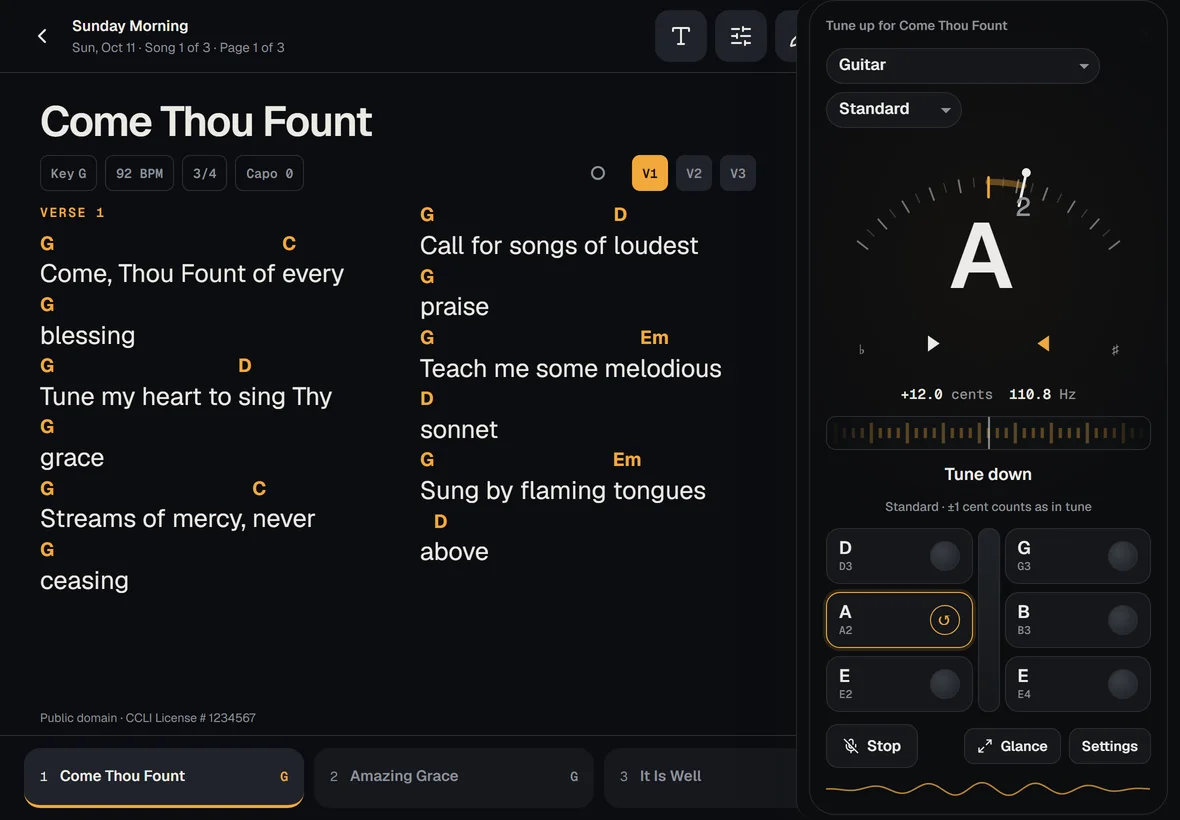
On an iPad the tuner sits beside the chart, so you tune between songs with the words still up.
Try it
This one pretends to hear a guitar.
A page on the website isn’t allowed your microphone; the real tuner listens. Press Pluck, then drag the peg (or use the arrow keys on it) until the amber ribbon stops. Or leave Auto demo on and watch it tune itself.
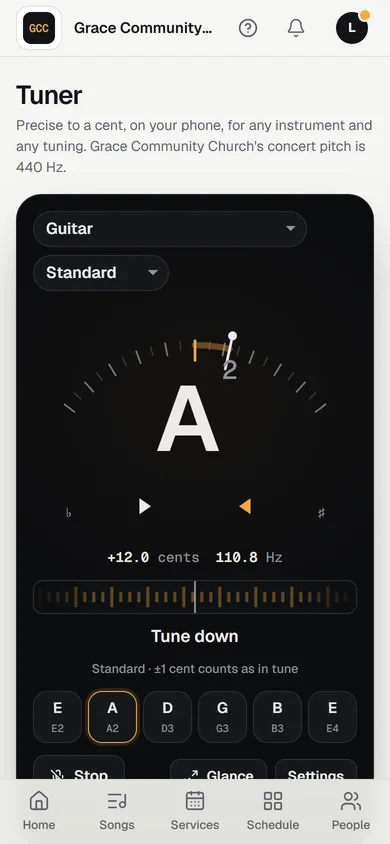
- A huge note, with the cents to a tenth and the hertz beside it, readable from a music stand.
- Two layers of precision. The needle shows how far off you are. Within a few cents, the amber strobe ribbon takes over: it drifts left when you’re flat and right when you’re sharp, slows as you get close, and stops dead when you’re in tune.
- An in-tune moment you can’t miss, even without colour: the two markers meet, the ring closes, a check appears, and the words say “In tune”.
- A string row that remembers. Finished strings stay ticked, and it moves on to the next one by itself. Tap a string to lock onto it in a noisy room.
- Plain words for volunteers: “Tune up a little”, “Tune down”.
The real one also speaks short updates to screen readers, swaps the moving ribbon for a still needle when a phone asks for less motion, and never sends your sound anywhere.
What it does
Every instrument on the platform. Every tuning you use.
To the cent
The last fraction of a cent, read from the sound itself. On test notes it reads within half a cent, a bass’s weak low B included.
Any instrument
Guitar (6, 7, or 12-string), bass (4, 5, or 6), ukulele, mandolin, banjo, violin, viola, cello, and double bass. Chromatic mode for voice, keys, and horns, with B♭, E♭, and F.
Any tuning
Every tuning PraisePad’s chord diagrams know, Drop D to DADGAD to a 5-string bass, and your own custom tunings. Left-handed flips the strings.
On the stage, on the song
From the stage it opens on the song’s own tuning and capo, and says when the next song needs a different one. Tune up between songs without leaving the set.
Your church’s pitch
It tunes to your church’s concert pitch, 440 Hz unless yours is set otherwise to match the piano. Your own override is a setting away, and so is how close counts as in tune.
Made for a phone on a stand
Glance shows a giant note readable from across the stage. The screen stays awake while you tune, and it stops listening the moment you leave.
Nothing is recorded, and the sound never leaves your device. The tuner listens on your phone or iPad and keeps nothing.
On the stage
Beside the chart on an iPad. Over it on a phone.
On an iPad held sideways the tuner opens as a panel beside the chart, so the words stay up while you tune. Your strings are laid out the way the headstock has them, with an arrow on the one you’re tuning that says which way to turn. On a phone it rises from the bottom and gets out of the way when you’re done.
Free on every plan
Yours with the charts, the set lists, and the stage.
The tuner comes with every plan, Free and Solo included. Every new church starts with 14 days of Team 10, no card needed.
Questions
Three quick ones.
- Why does my iPhone ask for the microphone?
- Every website has to ask before it can hear you. Allow it once in Safari; from the Home Screen app, Settings › Apps › Safari › Microphone › Allow stops it asking every time. The sound stays on the phone. The help article has the steps.
- Can I tune to our piano?
- Yes. An owner or admin sets the church’s concert pitch in Settings (440 Hz unless the piano sits elsewhere, 415 to 466), and everyone’s tuner follows it. Your own override lives in the tuner’s settings.
- Does it work for bass, violin, or singing?
- Bass down to a 5-string’s low B, the violin family, and chromatic mode for a voice or a horn, written for a B♭, E♭, or F instrument if you like.